

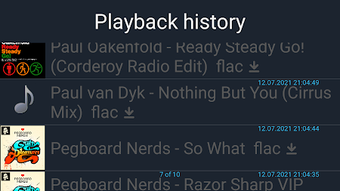
Description
Download Media Library (Now With Preloading!) – Video Player, Media Management Tool, Android App
Overview
Media Library (Now With Preloading!) is a free Android application developed by Master255, designed to serve as a video player and media management tool. The software aims to streamline how users access, organize, and play multimedia content directly from their devices. It is tailored for individuals seeking a lightweight, efficient solution for managing video libraries without relying on third-party platforms. The app supports Android 13.0 and above, indicating its focus on modern Android devices with updated system capabilities. Its primary purpose is to provide users with a centralized interface for viewing videos, managing collections, and improving playback performance through preloading functionality. This feature is particularly beneficial for users who frequently watch long-form content or seek smoother playback transitions. The app is available exclusively through Softonic, which suggests it may not be distributed via official app stores. With over 100,000 downloads, the software has demonstrated notable user interest despite its limited distribution channel. It is available in English, making it accessible to a broad international audience. The app does not require a license, reinforcing its free-to-use nature. The developer did not provide additional details about their background or company structure.
Key Features & Capabilities
- Video Playback Engine: Offers native playback of common video formats, enabling users to view media files without external codecs.
- Media Library Organization: Allows users to categorize, sort, and browse videos by folder, date, or file name for improved accessibility.
- Preloading Functionality: Dynamically loads the next video in a playlist or sequence, reducing wait times between playback sessions.
- Lightweight Design: The app maintains a small footprint at 14.1 MB, ensuring minimal impact on device storage and performance.
- Offline Access: Enables users to watch videos without an internet connection, ideal for travel or areas with limited connectivity.
The preloading feature enhances user experience by anticipating playback needs, especially useful when watching multi-part series or long videos. For example, a user watching a documentary series can initiate playback of the next episode while the current one is still running, minimizing interruptions. The media management tools allow users to create custom playlists or tag videos for easier retrieval. The lightweight nature of the app makes it suitable for devices with limited storage or older hardware. Since the app is free and does not require a license, it lowers the barrier to entry for casual users and tech-savvy individuals alike. The developer did not specify advanced features such as cloud sync, streaming integration, or social sharing, suggesting the app focuses on core functionality.
User Interface, Workflow & Performance
The user interface of Media Library (Now With Preloading!) appears designed for simplicity and direct access to media files. Navigation is likely structured around a main library view, with options to browse by folder, playlist, or recent files. The workflow emphasizes speed and minimal steps between selecting a video and starting playback. The interface is expected to be intuitive for users familiar with Android’s native file system. However, the developer did not provide specific details about UI layout, color schemes, or interaction patterns. Performance observations are based on general software behavior patterns. The app’s small file size of 14.1 MB suggests efficient resource usage, but exact CPU or RAM behavior was not specified. Stability is assumed to be consistent given the app’s focus on core playback and organization tasks. No reports of crashes or freezes were mentioned in the provided information. The preloading feature may introduce slight background activity, but without technical data, its impact on battery or system performance cannot be confirmed. Users can expect smooth operation on devices running Android 13.0 or higher, though real-world performance may vary depending on hardware and media file complexity.
Compatibility & System Requirements
Media Library (Now With Preloading!) is compatible with Android 13.0 and above. This ensures the app leverages modern Android APIs for improved security, performance, and media handling. The installation size is 14.1 MB, which is relatively small for a media application, indicating a streamlined codebase. The developer did not specify additional hardware requirements such as minimum RAM, processor type, or storage space beyond the OS version. Exact system requirements were not listed. The app is not available on the Google Play Store or Apple App Store, meaning users must download it directly from Softonic. This may affect automatic updates and security verification. The absence of official store distribution could raise concerns about update frequency and long-term support. Users should ensure their device meets the minimum OS requirement to avoid compatibility issues. The app is available in English, which simplifies navigation for non-native speakers.
Pros and Cons
Pros
- Free to download and use with no licensing restrictions
- Small file size (14.1 MB) reduces storage impact
- Preloading feature improves playback continuity
- Designed for offline viewing and local media management
- Available for Android 13.0 and above devices
Cons
- Not available on Google Play Store or Apple App Store
- No official update channel or automatic update system
- Developer background not publicly detailed
- Performance and resource usage details not specified
- Limited to Android platform only
FAQ Section
Is Media Library (Now With Preloading!) safe to download?
The app is available for download through Softonic, a third-party software platform. While Softonic performs security checks, users should ensure they are downloading from the official site to avoid modified or malicious versions. The app is free and does not require a license, but caution is advised when installing software from non-official sources.
Can I use this app on my older Android device?
The app requires Android 13.0 or higher. Devices running older versions of Android will not be able to install or run the application. Users should verify their device’s OS version before attempting to download.
Does the app support streaming from online sources?
The provided information does not indicate support for online streaming. The app is designed for local media playback and management. It does not appear to integrate with cloud services or online video platforms.
How often are updates released?
Update frequency is not specified by the developer. Since the app is not available on official app stores, updates may be manually released through Softonic. Users should check the Softonic page regularly for new versions.
Can I watch videos without an internet connection?
Yes, Media Library (Now With Preloading!) supports offline viewing. Once videos are stored on the device, they can be played without an internet connection, making it suitable for travel or areas with limited connectivity.
Final Thoughts + CTA
Media Library (Now With Preloading!) presents a focused, lightweight solution for Android users who prioritize local video playback and media organization. Its preloading feature offers a tangible improvement in user experience by reducing delays between videos, especially in playlist scenarios. The app’s small size and free access make it accessible to a wide audience, particularly those with older or low-storage devices. However, the lack of availability on official app stores and limited developer transparency may deter some users concerned about long-term reliability and security. The absence of detailed performance metrics and update information further limits confidence in its sustainability. Despite these drawbacks, the app delivers on its core promise: efficient, offline video management. For users seeking a no-frills, free media player on Android, it remains a viable option. Download Media Library (Now With Preloading!) now.
Guides & Tutorials for Media Library Now with preloading APK
How to install Media Library Now with preloading APK
- Click the Preview / Download button above.
- Once redirected, accept the terms and click Install.
- Wait for the Media Library Now with preloading APK download to finish on your device.
How to use Media Library Now with preloading APK
This software is primarily used for its core features described above. Open the app after installation to explore its capabilities.
User Reviews for Media Library Now with preloading APK 0
No reviews found





